 指南
指南react-native 微信授权
🚀祝你好运,逃掉微信折磨!!
因为react-native-wechat支持的sdk版本太低了,需要使用react-native-wechat-lib来实现微信授权功能。
WARNING
react-native-wechat-lib版本默认不是3.0以上,react-native最新版本请切换3.0以上版本
安卓
安装
//需要手动指明版本因为默认安装的是1.xx.xx的版本
yarn add react-native-wechat-lib@3.0.4
配置
- 在
android/app/src/main/java/[...]/MainApplication.kt中添加如下代码
java
// 添加这个
import com.wechatlib.WeChatLibPackage;


class MainApplication : Application(), ReactApplication {

  override val reactNativeHost: ReactNativeHost =
      object : DefaultReactNativeHost(this) {
        override fun getPackages(): List<ReactPackage> =
            PackageList(this).packages.apply {
              // Packages that cannot be autolinked yet can be added manually here, for example:
              // add(MyReactNativePackage())
              // 添加这个
               add( WeChatLibPackage())
            }

        override fun getJSMainModuleName(): String = "index"

        override fun getUseDeveloperSupport(): Boolean = BuildConfig.DEBUG

        override val isNewArchEnabled: Boolean = BuildConfig.IS_NEW_ARCHITECTURE_ENABLED
        override val isHermesEnabled: Boolean = BuildConfig.IS_HERMES_ENABLED
      }


}- 在
android/main/AndroidManifest.xml中添加如下代码
xml
  // AndroidManifest.xml

  <manifest xmlns:android="http://schemas.android.com/apk/res/android">
    <application
      android:name=".MainApplication"
      android:theme="@style/AppTheme">
      <activity
        android:exported="true">
        <intent-filter>
            <action android:name="android.intent.action.MAIN" />
            <category android:name="android.intent.category.LAUNCHER" />
        </intent-filter>
      </activity>

       <!--  这里添加wxapi -->
      <activity
        android:name=".wxapi.WXEntryActivity"
        android:label="@string/app_name"
        android:exported="true"
        android:taskAffinity="pro.aili.temporary"
        android:launchMode="singleTask"
      />
      <!-- ) -->
    </application>
     <queries>
        <!--  这个地方添加一个微信的package -->
     <package android:name="com.tencent.mm" />
      <intent>
        <action android:name="android.intent.action.VIEW" />
        <!-- If you don't know the MIME type in advance, set "mimeType" to "*/*". -->
        <data android:mimeType="application/pdf" />
      </intent>
    </queries>

</manifest>- 新建在安卓项目里面新建
wxapi文件夹
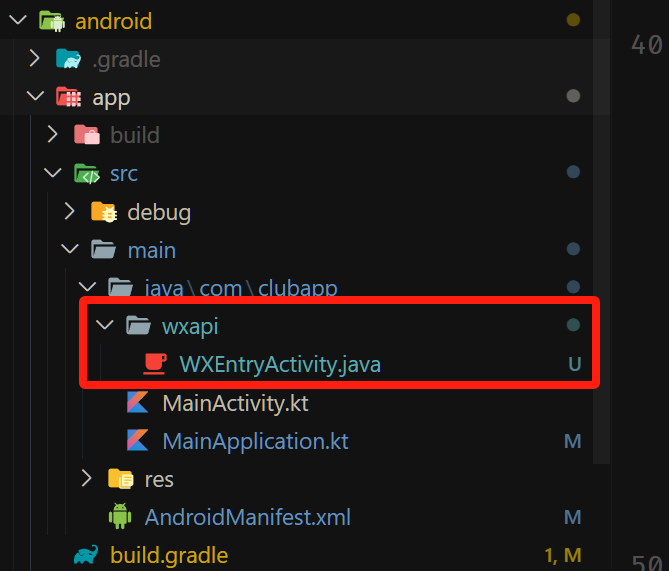
java
//WXEntryActivity.java
package com.clubapp.wxapi;
//微信登录上面包名应该填写应用包名
// react-native-wechat-lib support (
import android.app.Activity;
import android.os.Bundle;
import com.wechatlib.WeChatLibModule;

public class WXEntryActivity extends Activity {
  @Override
  protected void onCreate(Bundle savedInstanceState) {
    super.onCreate(savedInstanceState);
    WeChatLibModule.handleIntent(getIntent());
    finish();
  }
}
// )
ios
- 在
ios/[...]/AppDelegate.h中添加如下代码
objective-c
#import <RCTAppDelegate.h>
#import <UIKit/UIKit.h>
#import "WXApi.h"  //这行
@interface AppDelegate : RCTAppDelegate <UIApplicationDelegate, WXApiDelegate> //这里修改

@end- 在
ios/[...]/AppDelegate.mm中添加如下代码
objective-c
  #import "AppDelegate.h"

#import <React/RCTBundleURLProvider.h>
#import <React/RCTLinkingManager.h>

@implementation AppDelegate

- (BOOL)application:(UIApplication *)application didFinishLaunchingWithOptions:(NSDictionary *)launchOptions
{
  self.moduleName = @"clubApp";
  // You can add your custom initial props in the dictionary below.
  // They will be passed down to the ViewController used by React Native.
  self.initialProps = @{};

  return [super application:application didFinishLaunchingWithOptions:launchOptions];
}

- (NSURL *)sourceURLForBridge:(RCTBridge *)bridge
{
#if DEBUG
  return [[RCTBundleURLProvider sharedSettings] jsBundleURLForBundleRoot:@"index"];
#else
  return [[NSBundle mainBundle] URLForResource:@"main" withExtension:@"jsbundle"];
#endif
}

- (BOOL)application:(UIApplication *)application handleOpenURL:(NSURL *)url {
    return  [WXApi handleOpenURL:url delegate:self];
}

- (BOOL)application:(UIApplication *)application
  continueUserActivity:(NSUserActivity *)userActivity
  restorationHandler:(void(^)(NSArray<id<UIUserActivityRestoring>> * __nullable
  restorableObjects))restorationHandler {
  // 触发回调方法
  [RCTLinkingManager application:application continueUserActivity:userActivity restorationHandler:restorationHandler];
  return [WXApi handleOpenUniversalLink:userActivity
  delegate:self];
}

// ios 9.0+
- (BOOL)application:(UIApplication *)application openURL:(NSURL *)url
            options:(NSDictionary<NSString*, id> *)options
{
  // Triggers a callback event.
  // 触发回调事件
  [RCTLinkingManager application:application openURL:url options:options];
  return [WXApi handleOpenURL:url delegate:self];
}

@end- 在
ios/[...]/Podfile中添加如下代码
# 安装官方 SDK
pod 'WechatOpenSDK'
在组件中使用
tsx
import * as React from 'react';

import { StyleSheet, View, Text, Button, Alert, TextInput } from 'react-native';
import { getApiVersion, registerApp, openWXApp, sendAuthRequest, shareText } from 'react-native-wechat-lib';

export default function App() {
  const [versionNumber, setVersionNumber] = React.useState<string | undefined>();
  const [responseCode, setResponseCode] = React.useState<string | undefined>();

  React.useEffect(() => {
    console.log(registerApp);

    registerApp('appid', '').then((res) => {
      console.log("registerApp: " + res)
      getApiVersion().then((num) => {
        console.log("test: " + num)
        setVersionNumber(num)
        // openWXApp().then()
      })
    });

  }, []);

  function onLogin() {
    sendAuthRequest('snsapi_userinfo', '')
      .then((response: any) => {
        // todo 登录 response.code
        console.log(response.code)
        setResponseCode(response.code)
        Alert.alert('登录成功,code: ' + response.code)
      })
      .catch(error => {
        console.log(error)
        let errorCode = Number(error.code);
        if (errorCode === -2) {
          Alert.alert('已取消授权登录')
        } else {
          Alert.alert('微信授权登录失败')
        }
      });

  }

  function onShareText() {
    shareText({
      text: 'test content.',
      scene: 0
    }).then()
  }

  return (
    <View style={styles.container}>
      <Text style={styles.title}>Call wechat SDK demo</Text>

      <Text style={styles.versionBox} className="text-white">
        Version: {versionNumber}
      </Text>
      <TextInput value={responseCode} className="text-white" />
      <Text style={styles.versionBox} >
        responseCode: {responseCode}

      </Text>
      <View style={styles.buttonGroup}>
        <View style={styles.button}>
          <Button title={'拉起微信'} onPress={() => { openWXApp().then() }} />
        </View>
        <View style={styles.button}>
          <Button title={'授权登录'} onPress={() => { onLogin() }} />
        </View>
        <View style={styles.button}>
          <Button title={'分享'} onPress={() => { onShareText() }} />
        </View>
      </View>
    </View>
  );
}

const styles = StyleSheet.create({
  container: {
    width: '100%',
    // flex: 1,
    alignItems: 'center',
    // justifyContent: 'center',
  },
  box: {
    width: 60,
    height: 60,
    marginVertical: 20,
  },
  title: {
    marginTop: 48,
    fontSize: 24,

  },
  versionBox: {

  },
  buttonGroup: {
    width: '100%',
    padding: 6,
    marginTop: 24,
  },
  button: {
    margin: 6,

  }
});